Heide Rubiato | Full-Stack WordPress Developer

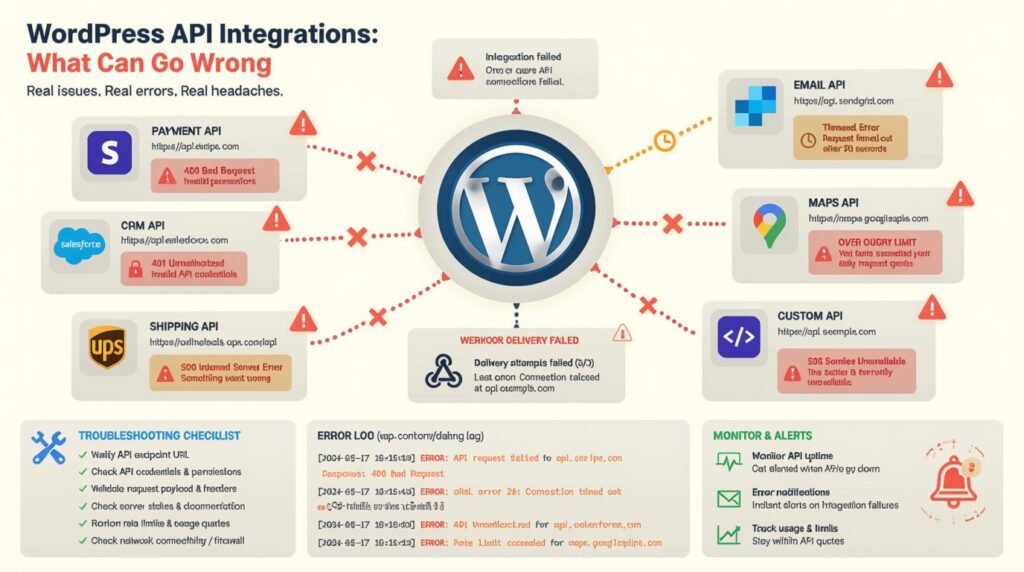
WordPress API Integrations: What Can Go Wrong
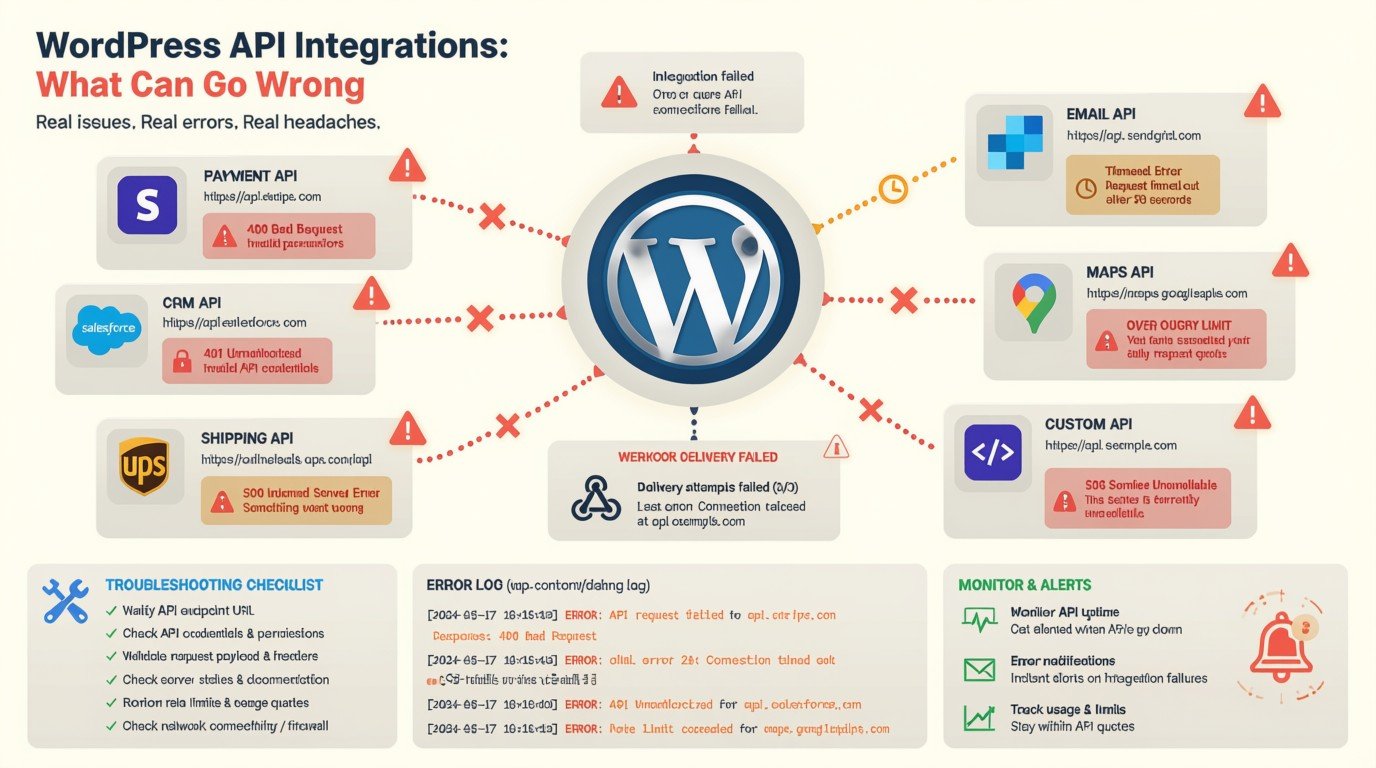
A practical look at the problems that can break WordPress API integrations and how I approach troubleshooting them
WordPress can connect to almost anything.
CRMs.
Payment gateways.
Booking systems.
Marketing platforms.
SaaS applications.
Inventory systems.
Analytics tools.
Custom business applications.
That flexibility is one of the reasons I enjoy working with WordPress as a development platform.
But integrations also introduce another layer of complexity.
A WordPress website may work perfectly on its own and still fail because an external API changed, authentication expired, a request timed out, data was formatted incorrectly, or the third-party service simply stopped responding.
I’ve worked with WordPress API integrations and third-party services across eCommerce, booking, payment gateways, CRMs, marketing systems, and custom workflows.
My role has included development, troubleshooting, debugging, and maintaining existing WordPress projects.
So when an integration breaks, I don’t start by randomly changing code.
I start by finding which part of the communication chain failed.
01
What Is a WordPress API Integration?
An API integration allows WordPress to communicate with another system.
For example:
WordPress → CRM
A form submission creates or updates a contact.
WordPress → Payment Gateway
A customer completes a payment and the transaction is returned to the website.
WordPress → Booking System
A customer selects an available appointment and the booking is sent to another platform.
WordPress → External API
The website requests data and displays it dynamically.
The basic process might look like:
User action → WordPress → API request → External system → API response → WordPress
Every step introduces another possible failure point.
02
Authentication Can Fail
One of the most common API problems is authentication.
An API may require:
- API keys
- OAuth tokens
- Bearer tokens
- Client IDs
- Signed Secrets
If credentials expire, are revoked, changed, or configured incorrectly, the integration can suddenly stop working.
The frustrating part?
The WordPress website itself may still look completely normal.
The failure happens when WordPress tries to communicate with the external system.
What I check
I look at:
- Authentication method
- Credentials
- Token expiration
- API permissions
- Environment configuration
- Request headers
- Error responses
The goal is to determine whether WordPress is reaching the API but being rejected, or whether the request isn’t reaching the API at all.
03
The API Changes
Third-party APIs aren’t permanent contracts.
An API provider may:
- Change an endpoint
- Rename a field
- Remove a field
- Change authentication requirements
- Change response formats
- Deprecate an endpoint
- Introduce a new API version
A website that worked six months ago can suddenly stop working.
This is one reason integrations need maintenance.
It’s not enough to build the connection once and forget about it.
04
The Data Format Doesn't Match
WordPress and the external system may expect different data structures.
For example, WordPress might send:
first_name
last_name
email
while the external system expects something completely different.
Even a small mismatch can cause the request to fail.
Common issues include:
- Incorrect field names
- Missing required fields
- Wrong data types
- Invalid dates
- Incorrect formatting
- Missing IDs
- Unexpected null values
This is why API debugging often starts by examining the actual request and response rather than assuming the data is correct.
05
The API Returns an Error
An API response can tell you a lot.
A request might return:
400 — Bad Request
401 — Unauthorized
403 — Forbidden
404 — Endpoint Not Found
429 — Too Many Requests
500 — Server Error
These errors shouldn’t simply be hidden.
They provide clues about what went wrong.
For example, a 401 points toward authentication.
A 429 may indicate rate limiting.
A 500 may indicate a problem on the external service.
The HTTP status is only part of the story, but it’s a useful starting point.
06
Timeouts Can Break the User Experience
External services aren’t always fast.
A WordPress request might depend on another server responding.
If that server is slow, the user can end up waiting.
Eventually the request may time out.
This can create problems such as:
- Slow forms
- Failed checkouts
- Duplicate submissions
- Incomplete bookings
- Poor user experience
- PHP execution issues
A good integration needs to consider what happens when the external service doesn’t respond quickly.
07
The Third-Party Service Can Go Down
Sometimes the WordPress website isn’t the problem.
The external service may be experiencing an outage.
If WordPress depends on that service, functionality can fail even though the WordPress server is healthy.
This is why integrations should be designed with failure in mind.
For critical functionality, consider:
- Error handling
- Logging
- Retry mechanisms
- Fallback behavior
- Notifications
- Monitoring
The user shouldn’t necessarily be exposed to a technical API error.
They should receive a useful message explaining what they can do next.
08
Rate Limits Can Suddenly Stop Requests
Many APIs limit how many requests an application can make.
For example:
A website may work perfectly during testing.
Then traffic increases.
Suddenly the API starts returning rate-limit errors.
This can happen because of:
- Too many requests
- Repeated API calls
- Inefficient loops
- Automated processes
- Multiple integrations using the same API credentials
Rate limits need to be considered when designing the integration, not after the API starts rejecting requests.
09
Webhooks Can Fail Silently
Some integrations work in the opposite direction.
Instead of WordPress requesting information, an external system sends information back to WordPress.
That’s commonly handled through webhooks.
For example:
Payment completed → Payment provider → WordPress webhook
If the webhook fails, WordPress may never receive the event.
This can lead to situations where:
- Payment succeeded but the order wasn’t updated.
- A CRM wasn’t updated.
- A booking wasn’t confirmed.
- A subscription status didn’t change.
Webhook integrations need proper validation, logging, and error handling.
10
Duplicate Requests Can Create Duplicate Data
This is particularly important for forms, payments, bookings, and CRM integrations.
Imagine a customer submits a form.
The request times out.
They don’t know whether it worked.
They submit again.
Now the external system receives two requests.
You could end up with:
- Duplicate CRM contacts
- Duplicate orders
- Duplicate bookings
- Duplicate transactions
This is why integrations sometimes need mechanisms to identify whether an operation has already been processed.
11
WordPress Cron Isn't Always Reliable Enough
Some API integrations depend on scheduled processes.
For example:
Every hour → WordPress requests API → Synchronize data
If the scheduled process doesn’t execute properly, the synchronization can become outdated.
This is particularly important for:
- Inventory
- Product data
- Orders
- External records
- Scheduled reports
- Automated workflows
When troubleshooting an integration, I don’t only inspect the API.
I also look at how the request is being triggered.
12
WooCommerce Adds Another Layer
API integrations become especially important in WooCommerce projects.
An online store may communicate with:
- Payment gateways
- Shipping providers
- CRMs
- Inventory systems
- Accounting platforms
- Marketing platforms
- Booking systems
I’ve worked on WooCommerce projects involving payment methods, eCommerce functionality, product customization, and third-party integrations.
A failure in one integration can affect the entire customer journey.
For example:
Product → Cart → Checkout → Payment → Order → CRM → Fulfillment
If one part fails, the order process may become inconsistent.
That’s why WooCommerce integrations need particularly careful testing.
13
Security Matters
API credentials should never be treated like ordinary content.
Sensitive information can include:
- API keys
- Secret keys
- Access tokens
- Client secrets
- Webhook secrets
These shouldn’t be exposed unnecessarily in frontend JavaScript or publicly accessible files.
Depending on the integration, credentials should be handled securely on the server side and protected through appropriate configuration and permissions.
Security should be considered from the beginning rather than added after the integration is already live.
14
Logging Is Essential When Things Go Wrong
When an API integration fails, you need evidence.
Without logging, you’re often guessing.
Useful information can include:
- Timestamp
- Endpoint
- HTTP status
- Request type
- Response
- Error message
- Relevant record ID
- Integration status
But logging needs to be handled carefully.
Sensitive information such as passwords, API secrets, payment information, or private customer data shouldn’t simply be dumped into logs.
Good logging helps developers understand what happened without creating another security problem.
15
Development and Production Can Behave Differently
An integration can work perfectly in staging and fail in production.
Why?
Because the environments may have different:
- API credentials
- URLs
- PHP versions
- WordPress configurations
- Firewall rules
- Server settings
- Plugin versions
- Environment variables
I’ve worked with both staging and live WordPress deployments, which is why I treat environment differences as an important part of integration troubleshooting.
Before assuming the code is broken, I compare the environments.
16
Plugins Can Conflict With Integrations
WordPress websites often contain multiple plugins.
One plugin may:
- Modify requests
- Change authentication
- Alter WooCommerce behavior
- Add redirects
- Modify caching
- Change hooks
- Intercept form submissions
This can make API failures difficult to diagnose.
That’s why troubleshooting sometimes requires isolating the integration and checking what happens when related plugins or custom code are removed from the equation.
My experience includes troubleshooting plugin conflicts, debugging existing WordPress projects, and maintaining production websites.
17
How I Troubleshoot a WordPress API Integration
When an integration breaks, I follow the communication chain.
01 — Reproduce the Problem
First, I determine exactly what action causes the failure.
02 — Check the Request
What is WordPress actually sending?
03 — Check Authentication
Are the credentials valid?
Is the token still active?
Does the application have the required permissions?
04 — Check the Response
What is the API returning?
05 — Check the Data
Are the field names, formats, and values correct?
06 — Check the Environment
Does the problem occur in staging, production, or both?
07 — Check WordPress
Look at plugins, hooks, custom code, cron jobs, WooCommerce, and server configuration.
08 — Check the External Service
Is the API experiencing an outage, rate limit, or service-side error?
09 — Add or Review Error Handling
The integration should fail gracefully rather than leaving users with a broken experience.
10 — Test the Entire Workflow
Fixing the API request isn’t enough.
The complete business process needs to work from beginning to end.
18
API Integration Isn't Just Connecting Two Systems
This is probably the biggest lesson I’ve learned from working with integrations.
Connecting WordPress to an API is the easy part.
Building an integration that continues working when something goes wrong is the real challenge.
A production integration needs to account for:
- Authentication failures
- API changes
- Invalid data
- Timeouts
- Rate limits
- Server errors
- Duplicate requests
- Webhook failures
- Environment differences
- Plugin conflicts
- Security
- Logging
- Recovery
That’s what separates a quick API connection from a production-ready integration.
My Final Thoughts
WordPress API integrations can dramatically extend what a website is capable of.
They allow WordPress to communicate with CRMs, payment platforms, booking systems, SaaS applications, and other business systems.
But every external dependency introduces another potential point of failure.
That’s why I approach API integrations from both sides:
How do we make the connection work?
And more importantly:
What happens when the connection doesn’t work?
A reliable integration isn’t one that works only when everything is perfect.
It’s one that knows how to fail safely, recover when possible, and give developers enough information to fix the problem.
WordPress API integrations · WooCommerce · Third-party services · CRM integrations · Payment gateways · Custom WordPress development
Need Help With a WordPress API Integration?
Building an integration, troubleshooting an existing connection, or trying to figure out why WordPress isn’t communicating correctly with another system?
I can help diagnose the issue and work through the WordPress, API, WooCommerce, authentication, data, and server-side layers involved.
Let’s Fix the Integration
- BLOG